


.png)
In 2026, the internet and social media platforms are a constantly changing landscape. Relatively speaking, it wasn't that long ago that being on Twitter was actually a good place to connect with colleagues within your professional circles within Australia and globally. Nowadays, Twitter isn't even called Twitter any more, and... the less said about the content popular there now the better!
One social media platform that has undergone a less drastic change is LinkedIn, which is essentially the social media for professional networking. LinkedIn is essentially used for two things: sharing professional updates (from companies and individuals) and sharing professional opportunities (jobs, professional development, courses etc.).
There are certain kinds of professions that really thrive on LinkedIn: business, finance, law, non-profit management, etc. etc. But increasingly people from many industries are seeking a place to connect online that isn't as 'personal' as other platforms. For instance, since the downfall of Twitter, many academics have moved to LinkedIn to share their professional updates, keeping spaces like Facebook or Instagram for personal connections.
So why be on LinkedIn?
LinkedIn is a really good way to figure out what is happening and who is active in your field. It is estimated that up to 80% of jobs are not advertised traditionally, and connecting with your professional networks is one way to find out about what's possible and where.
But just like any social space (online or not) there are some unwritten rules that it is worth thinking about before you dive in. In this post, and the next, I'll explain some of the landscape of LinkedIn as it is in 2026.
What to put in your profile?
You can treat your LinkedIn profile like a resume. It should give a sense of who you are as a professional. Your 'About' section should read as if you are telling someone both who you are, and who you want to be as a professional person.
You don't have to include every job you've ever had. You should give some context about what the job attained, and in that description, try to use strong verbs to describe what you achieved (without lying).
Do include your volunteering or service roles in your profile: these help to show who you are as a whole person, and can inform the kinds of skills that employers or networks assume that you have.
Refining and aspiring
One way to improve your profile is to find the profiles of people who work in the field you want to work in, preferably in roles you would like to have, and see what kinds of verbs and achievements they highlight. How do they describe their job? What do they put in their 'Headline' (the descriptor that appears underneath your name)? Don't copy and paste someone else's profile elements; take inspiration! It's best if you look at a few different profiles to get a sense of common themes.
Caution: a unique feature of LinkedIn is that people are able to see who has viewed their profile. If you do not want someone to know you've viewed their profile (for whatever reason), you may be able to view some of their profile through an incognito tab. If not, choose people who you already know, or who are well-known enough that it won't be unusual for 'random' viewers.
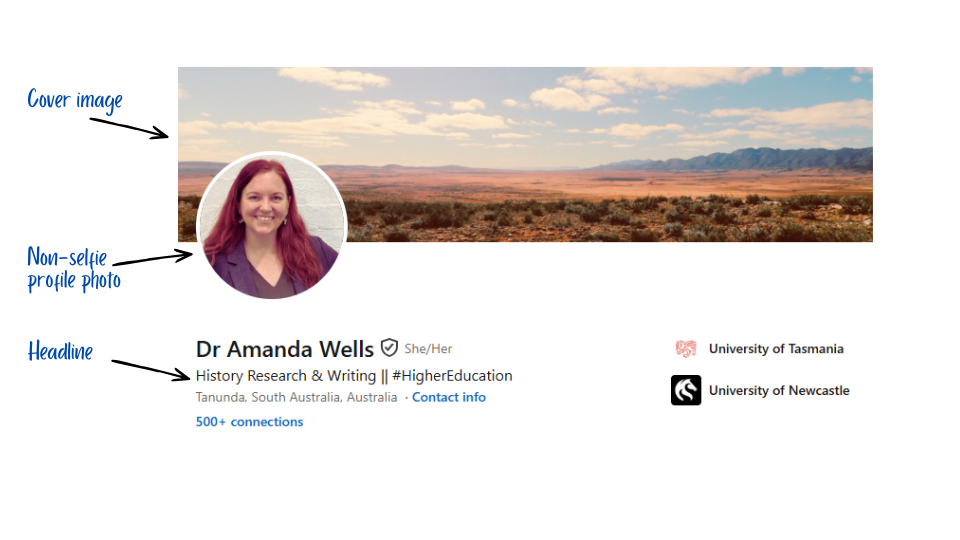
Headlines can be up to 220 characters, but only 70 characters appear visible (without clicking 'more') on the mobile view. Use this space to describe what you're about, not necessarily your job title. Think key words.
If possible, use a photograph of you that shows you as a professional... ideally taken by a professional photographer. Selfies are not advisable here!
Similarly, you can add a 'cover photo' for your profile. If you have an image of yourself at a professional or academic setting (especially if it is a high quality photograph), you can use that. Otherwise, choose an image that subtly says something about who you are in your career -- how do you want people to think of you?
For example, my profile cover is an Australian landscape image, with a slightly sepia filter implying that the photograph might be from the 1960s. I chose this because I want people to associate my work with Australian places, and that my research has largely been about 20th century Australia. It does double duty because I am also working in the field of regional, rural, and remote access to higher education. But don't overthink this element -- it is not a 'make or break' part of your profile, and can be easily changed if the perfect image comes along.
Caution: when updating your profile, you can turn on or off the option to share your update with your connections. I would advise only sharing when you have a new update to share, for example you've completed a qualification, got a new job, been promoted, or won an award.
You're ready
In the next part, I'll discuss how to connect and engage with people on LinkedIn.

